We’re sure you’ve re-typed the same instructions into Claude more than once. The brand voice rules, the report formats, the list goes on.
Skills plug the gap. They’re folders of instructions that Claude loads on its own when a task matches, so your rules combine with the work naturally instead of you pasting them in.
Anthropic launched them in October 2025 and published the format as an open standard two months later, which Microsoft, OpenAI, Vercel, and Cursor have since adopted.
Read on as we cover ten Claude skills for marketers with the description line and a prompt for each.

How Skills Work
A skill is a folder containing a SKILL.md file. To manage them, head to this window in Claude’s settings.
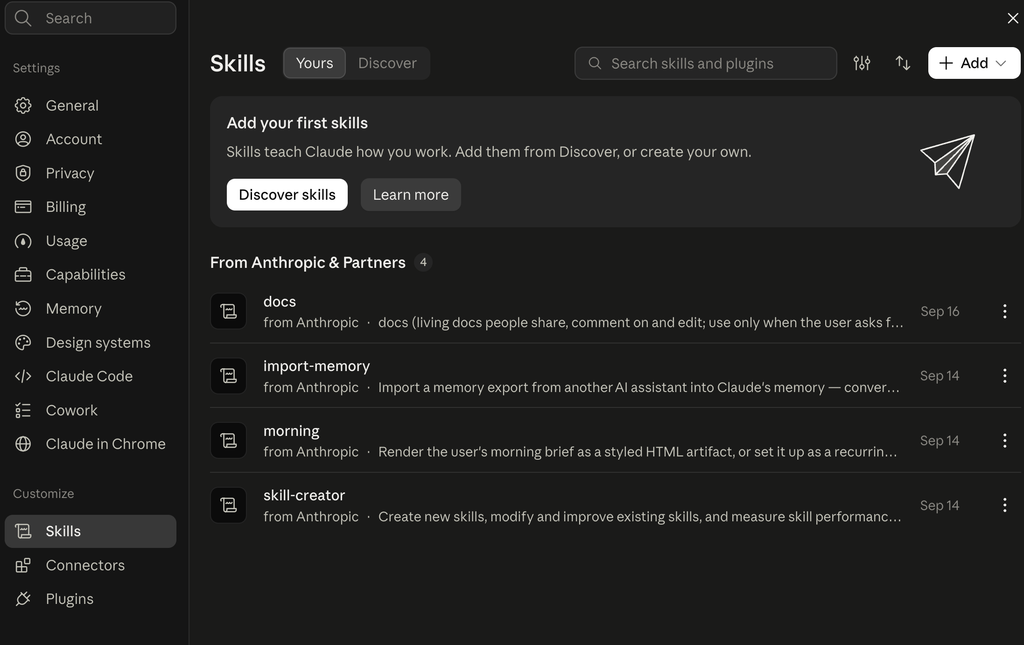
Each skill contains the following:
- A name up to 64 characters.
- A description up to 200 characters.
- Plain text body telling Claude how to behave when it’s enabled.
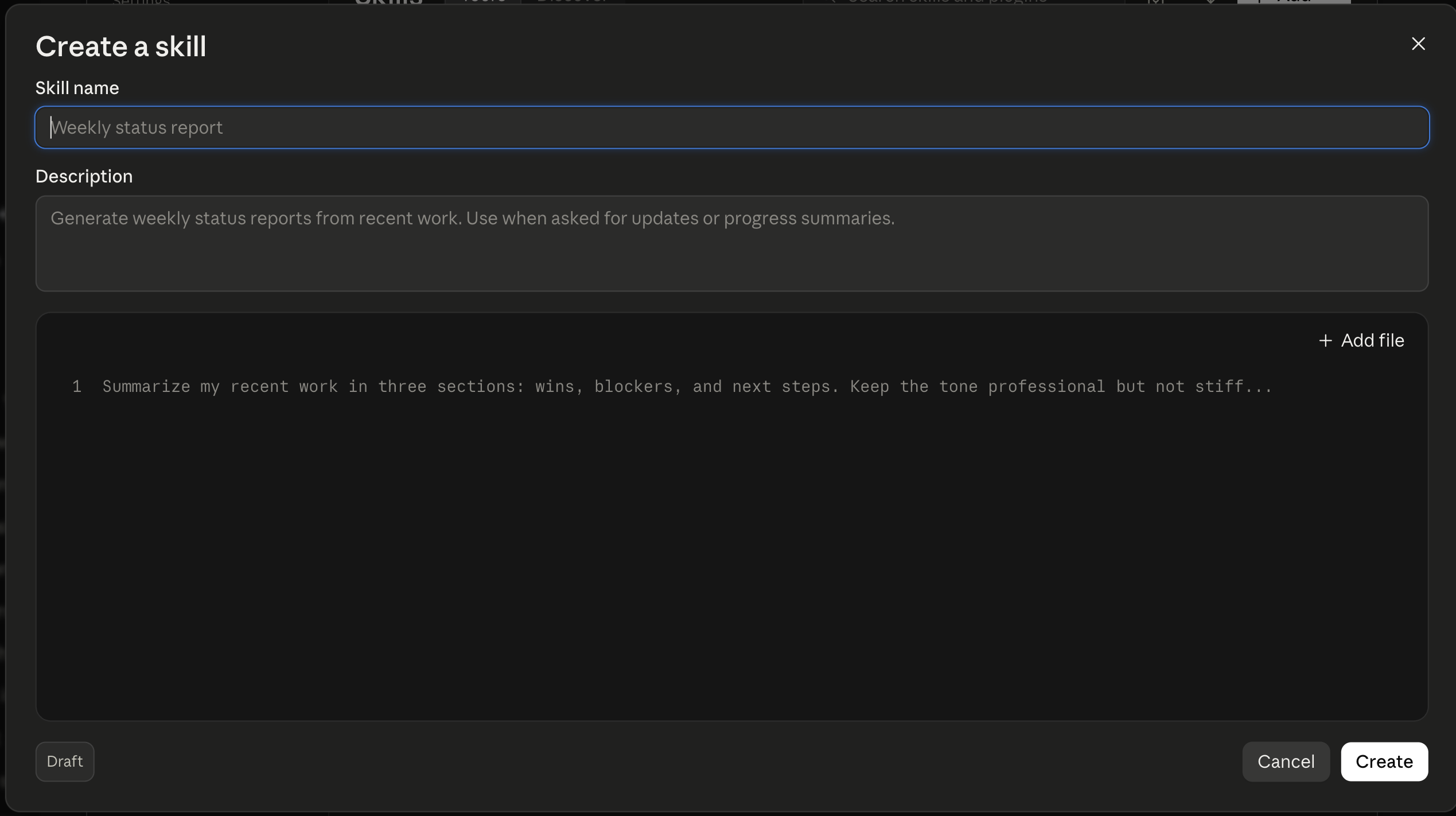
The description is key, because Claude reads it to decide whether the skill applies. At the start of a session, it loads only the names and descriptions, around 100 tokens each. The full instructions load only when a task matches.
Skills work on Free, Pro, Max, Team, and Enterprise plans, across Claude.ai, Claude Code, and the API. You’ll need code execution switched on.
Be aware that the official Skills Directory is full of partner tools from Notion, Canva, Figma, and Atlassian. There’s no SEO skill or paid ads skill waiting in there for you. You’ll build the most useful ones yourself, and it doesn’t take long at all.
How To Create Claude Skills
There are three ways to create Claude skills:
- Ask Claude to write it (the easy way): Describe the workflow in an ordinary chat and ask Claude to build the skill from it. You get a draft to read through, and you save it to your skills list from the conversation. This is the quickest route.
- Record yourself doing the job: In Cowork on Claude for Mac, open the “+” menu and choose Record a skill. Work through the task for up to ten minutes while narrating what you’re doing, and Claude writes the skill from what it watched. Available on Pro, Max, and Team.
- Upload one somebody else built: Skills shared on GitHub arrive as a ZIP file. Go to Customize, then Skills, then “+”, then Create skill, then Upload a skill.
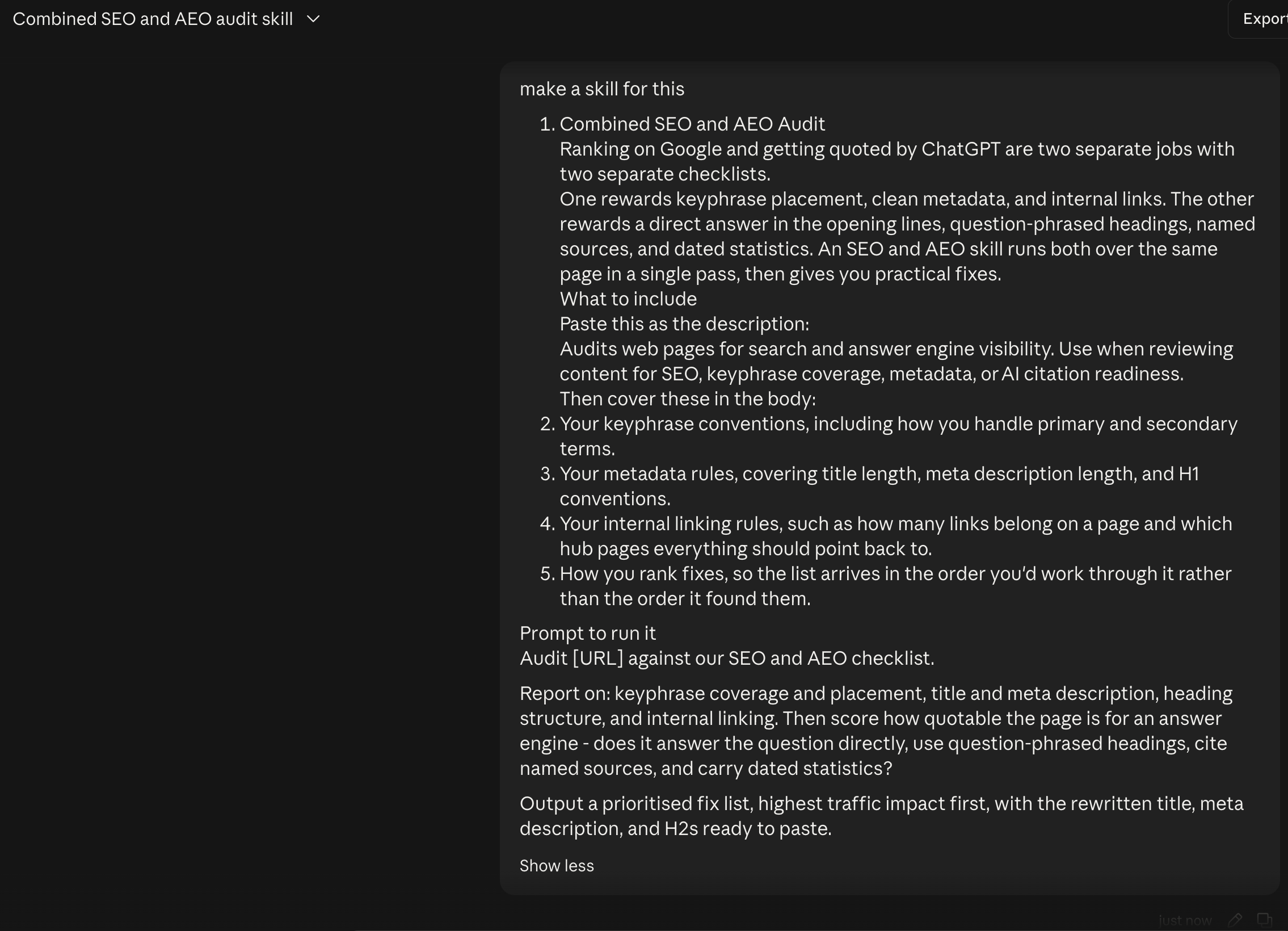
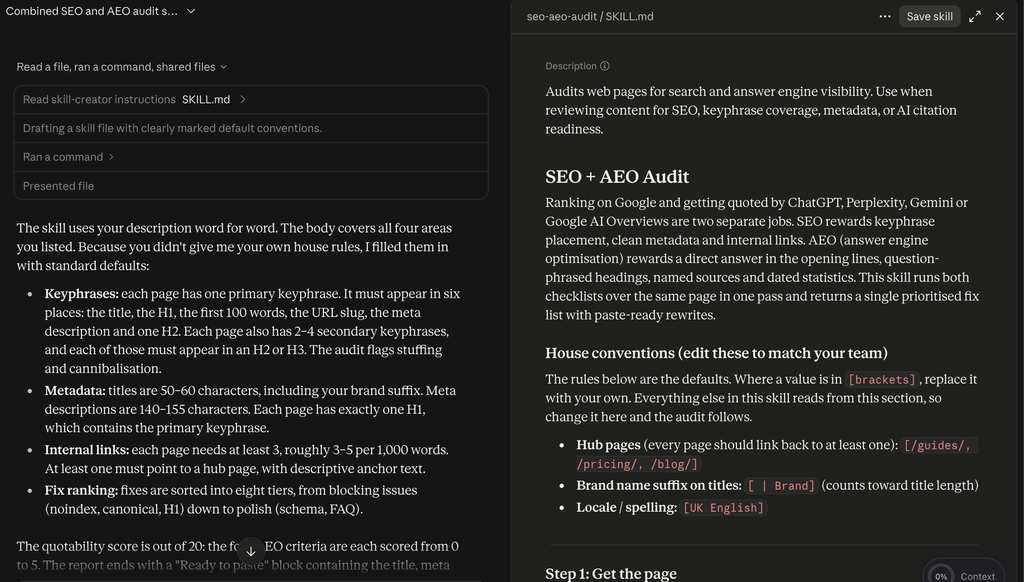
1. Combined SEO and AEO Audit
Ranking on Google and getting quoted by ChatGPT are two separate jobs with two separate checklists.
One rewards keyphrase placement, clean metadata, and internal links. The other rewards a direct answer in the opening lines, question-phrased headings, named sources, and dated statistics. An SEO and AEO skill runs both over the same page in a single pass, then gives you practical fixes.
What to include
Paste this as the description:
Audits web pages for search and answer engine visibility. Use when reviewing content for SEO, keyphrase coverage, metadata, or AI citation readiness.

Then cover these in the body:
- Your keyphrase conventions, including how you handle primary and secondary terms.
- Your metadata rules, covering title length, meta description length, and H1 conventions.
- Your internal linking rules, such as how many links belong on a page and any pillar posts you want to prioritse links to.
- How you rank fixes, to quickly help you make the needed changes.
Prompt to run it
Audit [URL] against our SEO and AEO checklist.
Report on: keyphrase coverage and placement, title and meta description, heading structure, and internal linking. Then score how quotable the page is for an answer engine – does it answer the question directly, use question-phrased headings, cite named sources, and carry dated statistics?
Output a prioritised fix list, highest traffic impact first, with the rewritten title, meta description, and H2s ready to paste.
2. Paid Ads Variants
Writing ad variants is a volume exercise where you need choice and experimentation. A paid ads skill helps ensure consistency and compliance, giving you effective hook patterns to produce copy that’s near-enough ready to upload.
What to include
Paste this as the description:
Writes and iterates ad variants for Google, Meta, and LinkedIn. Use when drafting ad copy, headlines, hooks, or testing variations.
Then cover these in the body:
- The placements you buy and the character limits for each.
- Claims you can’t legally make, plus any competitor comparisons legal has vetoed.
- Three or four hook patterns that have worked for you, each with a real example.
- Your offer structure and how the CTA should read on each platform.
Prompt to run it
Write ad variants for [product] targeting [audience].
Platform: [Google / Meta / LinkedIn]. Objective: [objective]. Pain point we’re addressing: [pain]. Offer: [offer].
Give me 5 variants using a different hook pattern each, all within the character limits. For each one, note which pattern it uses and what it’s testing, so I can read the results properly.
3. Analytics Reporting
Stakeholders want to understand the track KPIs. An analytics skill reads a raw GA or campaign export and builds the report around that question, covering what changed, what caused it, and what you’re recommending.
What to include
Paste this as the description:
Turns GA4 and campaign exports into a written performance report. Use when analysing traffic, campaign data, or preparing monthly reporting.
Then cover these in the body:
- The metrics that matter to your business and, more usefully, the ones to ignore.
- Your reporting periods and what each number gets compared against.
- The structure: headline, what changed, why, what next, etc.
- Thresholds and tolerances, so a 2% wobble doesn’t get reported as a trend. You can ask Claude for recommendations.
Prompt to run it
Here’s our GA4 export for [period]. [attach]
Write the monthly performance report. Lead with the single most important change. Explain what moved, by how much, and what most likely caused it. Flag anything that looks like a tracking problem rather than a real change.
Close with three recommendations, each tied to a number in the data. Keep it to one page and write it for people who don’t use GA4.
4. Brand Voice
A brand voice skill learns your writing from samples you provide, then checks or rewrites any copy in that tone. It’s an excellent way to keep your copy and materials consistent under the hood without constantly reminding the AI.
This skill also compounds across other skills, so it pays back rapidly.
What to include
Paste this as the description:
Applies and checks our brand voice. Use when writing, editing, or reviewing any customer-facing copy.
Then cover these in the body:
- Several samples of writing you’re happy with, in full rather than as excerpts.
- Words, phrases, and constructions you never use.
- How the voice changes by channel, since your LinkedIn voice and your support email voice shouldn’t match.
- A before-and-after pair showing a weak line and the version you’d publish.
- Any other relevant rules or motifs.
Prompt to run it
Rewrite this in our brand voice: [paste]
Then tell me what you changed and why, so I can check you’ve understood the voice rather than just smoothed the text.
Flag anything in the original that broke our rules, and anything you weren’t sure about.
5. Campaign Planning
Campaign plans typically follow the same structure every time, so they’re ripe for encoding with a Claude skill.
Hand it a brief, and it returns a channel mix with reasoning behind each choice, a timeline attached to your launch date, and the respective deliverables.
What to include
Paste this as the description:
Builds multi-channel campaign plans from a brief. Use when planning a launch, campaign, or go-to-market activity.
Then cover these in the body:
- The channels you actually run, so it stops suggesting ones you don’t.
- Your real lead times per channel, which is the detail that makes a timeline honest.
- The deliverables each channel needs, from ad sizes to email counts to landing page requirements.
- How you measure success per channel, so it’s baked into the plan.
Prompt to run it
Build a campaign plan from this brief: [paste brief]
Include: objective and target audience, channel mix with a reason for each, week-by-week timeline working back from [launch date], the full deliverables list per channel, and success measures.
Flag any deliverable that won’t make the timeline given our normal lead times, and tell me what to cut first if the date moves.
6. Social Media
Turning one idea into posts for several platforms is a grade-A AI use case. So why not automate it with a neat Claude Skill?
A social media skill writes each version for its own platform, so your LinkedIn post hook changes for X, etc., and you can quickly encode rules and repurpose across platforms.
What to include
Paste this as the description:
Turns one idea into platform-native social posts. Use when writing for LinkedIn, X, Instagram, or any social channel.
Then cover these in the body:
- The platforms you publish on and the shape a post takes on each.
- Hook styles that work per platform, with an example of one that performed.
- Your hashtag rules, including how many and whether you use them at all on each channel.
- What never appears in a post, covering emoji use, engagement bait, and anything your brand avoids.
Prompt to run it
Turn this into social posts: [paste article, insight, or announcement]
Write for [platforms]. Each one should be native to its platform rather than the same text trimmed to fit – different hook, different length, different structure.
Give me two hook options per platform and tell me which you’d publish and why.
7. Content Research
AI used to have a reputation for inventing sources, though this problem has lessened in recent years. However, AI can still cite whatever ranks, which may mean a competitor’s blog post or a stat roundup quoting a statistic nobody can trace to an original.
A content research skill dictates your research standards. You can direct Claude to primary sources, enforces your date limit on statistics, and returns an outline in a format useful to you.
What to include
Paste this as the description:
Researches a topic and produces a sourced content outline. Use before writing any article, report, or long-form content.
Then cover these in the body:
- Your sourcing standards, such as prioritizing primary sources over aggregators and setting a date limit for statistics.
- A rule that every claim needs a link to an original source, and that anything traceable only to a roundup gets dropped.
- The outline format you write from, including heading structure and target length.
- Which sources you trust in your sector, and which you’d rather not cite.
Prompt to run it
Research [topic] and build me a content outline.
Find primary sources only – original research, company announcements, regulatory filings. No SEO roundups. Anything older than [timeframe] gets flagged as dated.
Output: the outline with H2s and H3s, the specific claim to make under each, and the source link for every one. List anything you couldn’t verify separately so I can decide whether to chase it.
8. Email Marketing
You might already have a strong email marketing strategy, from subject line length to sequence timing and the email copy itself. An email skill can combine that knowledge with your segments and other information, so you’re not rebuilding emails from scratch every campaign.
What to include
Paste this as the description:
Drafts subject lines, preview text, and email sequences. Use when writing marketing emails, nurture flows, or lifecycle campaigns.
Then cover these in the body:
- Your house rules for subject line and preview text, including how the two should work together rather than repeat each other.
- The subject line patterns your list opens, and the ones it has stopped responding to.
- Your sequence structures for welcome, nurture, and win-back, with timing between sends.
- The segments you send to and how the message changes for each.
Prompt to run it
Draft a [sequence type] for [segment].
Give me [number] emails with send timing between each. For every email: subject line plus two alternatives, preview text, full body copy, and one CTA.
Tell me what each email is meant to achieve and what I should look at to know whether it worked.
9. UGC Briefs
Creator briefs require a hook, a script, a shot list, and the claims they’re allowed to make. A UGC skill produces all of it in one pass, so you can brief several creators on different angles in the time it used to take to brief one.
What to include
Paste this as the description:
Creates creator briefs and short-form video scripts for UGC campaigns. Use when briefing creators or planning UGC content.
Then cover these in the body:
- Your brief template, covering hook, scenes, product moments, and CTA.
- Platform specs for the placements you buy, including length and aspect ratio.
- What creators must say, must show, and must never claim, which keeps you compliant.
- Two or three creator personas you cast for, so the script matches the voice.
Prompt to run it
Create UGC briefs for [product]. Audience: [ICP].
Give me [number] concepts, each testing a different pain point. For each one: creator persona, the hook in their words, scene-by-scene script with timings, what needs to be visible on screen, and the CTA.
Add the compliance notes at the bottom of each brief – what they can’t say about the product.
10. Executive Brief
An executive brief skill condenses your reports, campaign plans, and decks into a single page for leadership. You can drop whatever you need in the chat, enable it, and watch beautiful report decks come together in the same format every time.
What to include
Paste this as the description:
Condenses reports, decks, and long documents into a one-page executive summary. Use when preparing updates for leadership.
Then cover these in the body:
- The format your leadership team expects, including what one page means in practice.
- What they care about, e.g., revenue impact, risk, and what needs deciding.
- A rule that every brief ends with recommendations and a clear ask, not a recap.
- One finished brief that landed well, since a single example teaches more than a description.
Prompt to run it
Condense this into a one-page executive brief: [attach]
Open with the decision or the headline number, not with background. Cover what happened, what it means commercially, and what we’re recommending.
End with the specific ask – what you need from them and by when. Cut anything they don’t need to make the decision.
The Compounding Power Of Claude Skills
Once you’re in the swing of using them, Claude Skills tend to compound. Ask for social posts about a campaign, and Claude can use your brand voice skill and your social skill together without you naming either one.
This is also the argument for keeping them relatively narrow rather than building something too much.
Remember to tweak and edit your skills to improve the results. Examples are key, so use them liberally.
The one thing worth getting right early is the description line, since that’s what Claude reads when deciding whether a skill applies to what you’ve asked for. Vague descriptions can throttle your results.
Want to go deeper into building an AI stack your team will use? Register for our upcoming AI for Marketers Summit!