
Your rankings look healthy, and impressions are up, but organic clicks keep declining. Sounds familiar?
That’s likely the impact of zero-click search, where Google, ChatGPT, Gemini, and Perplexity answer questions directly.
We’re in an internet era where people don’t always need to visit your site. It’s a trend we’re all participating in every time we use AI search tools.
While this initially plunged marketers into darkness, the good news is that most of it is now measurable, thanks to new AI reporting in Search Console and Google Analytics 4 (GA4).
Read on to learn about how zero-click is changing tracking and reporting and what you can do about it.

Zero-Click: What the Research Shows
Zero-click means queries tend to start and stop on the same channel.
You ask Google, ChatGPT, etc, a question, and get an answer. Case closed. Unless you want to do something else, like browse a product, service, or otherwise get more information.
The zero-click research shows:
- Clicks nearly halve with an AI summary: Pew Research Center tracked 900 US adults across nearly 69,000 searches. People clicked a traditional result in 8% of visits with an AI summary, against 15% without one. Just 1% clicked a link inside the summary.
- Longer questions trigger more summaries: In the same study, 53% of searches with 10 or more words produced an AI summary, against 8% of one- or two-word searches.
- The top result loses most: Ahrefs found position-one click-through rate is 58% lower when an AI Overview appears, up from 34.5% a year earlier.
- Most AI Overview searches end without a click: Advanced Web Ranking’s July 2026 data shows 74.3% of them produce no organic click at all.
- Being cited still pays: Seer Interactive’s study of 53 brands found cited brands earn around 120% more clicks per impression than uncited brands on the same results page.
On the plus side of all of this, users often still want to do something at the end of their search process. It may not be in that same session, but down the line when they’re ready to enquire or buy.
Optimizing for zero-click makes your business top-of-mind when curiosity turns to action.
How Often Does Google Show You in AI Answers?
The Generative AI performance report in Search Console is the simplest way to answer that.
Google rolled it out to all websites on August 31, 2026, and the data only extends back to May 18, 2026. In Search Console, open Performance, and you’ll find it as “Get more details on your site’s performance in generative AI features on Google Search.”

The report counts impressions – how often a link to one of your pages appeared in an AI Overview or in AI Mode.
You can compare it with your main Performance report, where you can see which pages earn actual clicks. Export the top pages from each, then look for three patterns:
- High in both clicks and impressions: These pages appear in AI answers and still earn clicks, so they need little attention.
- Strong AI impressions, declining clicks: Google shows these pages in AI answers, but people get what they need from the answer and don’t click through. This is likely where most of your lost traffic comes from.
- Top click earners missing from the AI report: These pages still earn clicks from regular search, but Google isn’t using them in AI answers. They’re your best chance of earning new citations.
You can also copy your data into AI to explain it all for you.
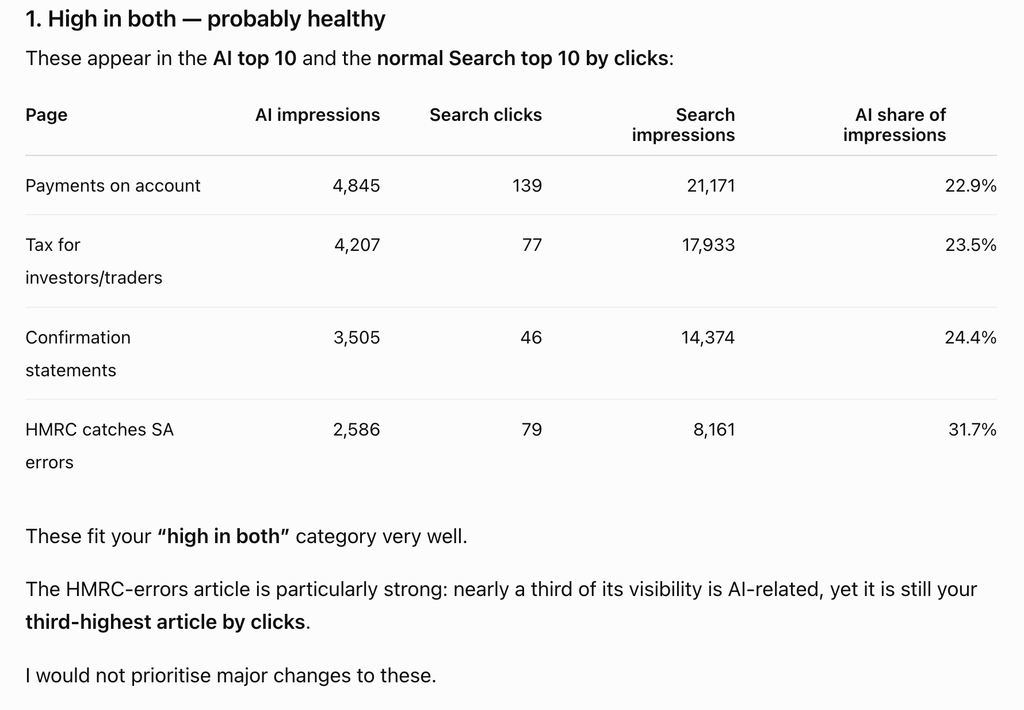
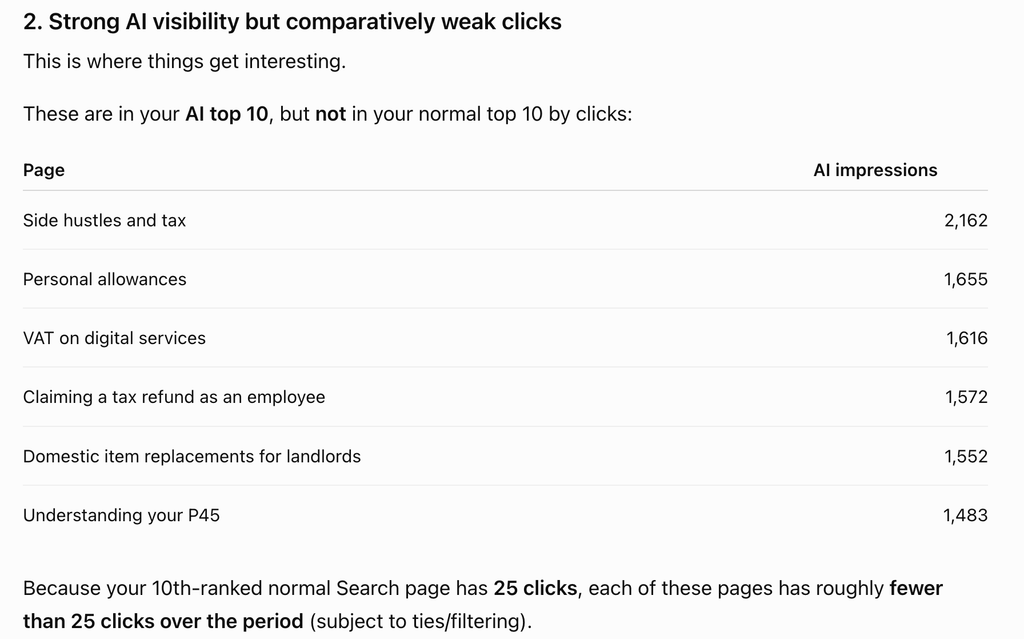
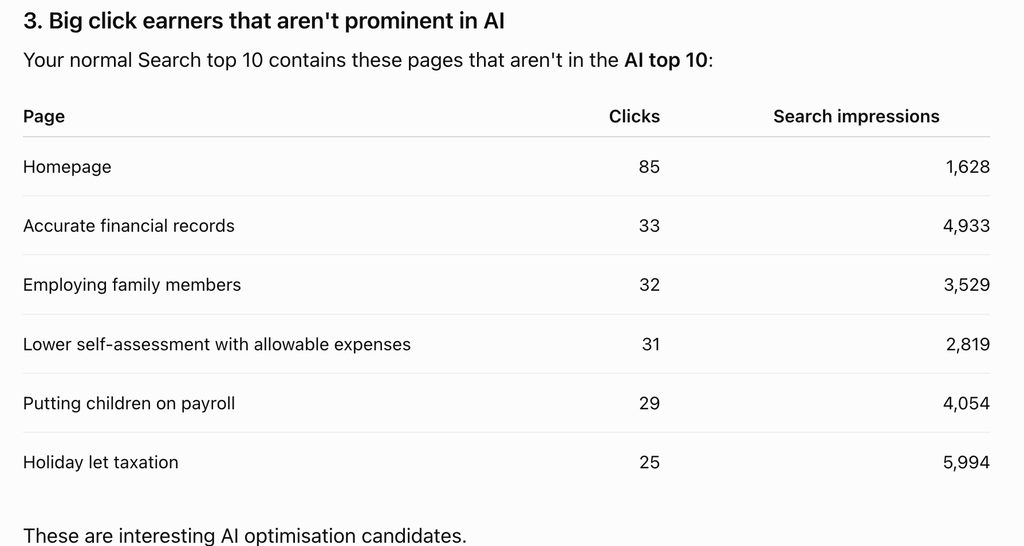
According to ChatGPT’s own recommendations of what to do here:
- High in both: Leave mostly alone and protect/update them because they already win in both AI visibility and clicks.
- Strong AI impressions, weak/declining clicks: Rework them to create stronger reasons to click, such as deeper examples, tools, comparisons, calculators, or next-step advice.
- Top click earners missing from AI: Optimize them for AI citation by making answers clearer, more structured, authoritative, and easy for Google to extract.
How Much Traffic Do AI Tools Send You?
For this, you’ll use GA4. Since May 13, 2026, it’s grouped visits from AI assistants into a channel called AI Assistant, under Reports, then Acquisition, then Traffic acquisition.
But it’s not very reliable. It doesn’t even show at all on some properties. When Search Engine Journal tested the channel, it also found some ChatGPT visits counted as Referral and Unassigned instead.
Build a channel that counts all AI traffic
You can fix this by creating your own channel, one that groups visits by the website they came from:
- Go to Admin, then Data display, then Channel groups, and create a new channel group.
- Add a channel called AI Assistants. Set the condition to Source, choose “matches regex,” and paste in the pattern below.
- Move AI Assistants above Referral in the list, then save. GA4 assigns each visit to the first channel that matches, so this order makes sure AI visits are counted as AI.
- Switch your acquisition reports to the new channel group.
.*(chatgpt\.com|openai\.com|perplexity\.ai|claude\.ai|gemini\.google\.com|copilot\.microsoft\.com|deepseek\.com|grok\.com).*
The pattern is a list of AI websites. Each | means “or,” so GA4 counts a visit from chatgpt.com, perplexity.ai, claude.ai, or any other site on the list. To add another assistant later, type a | followed by its web address, with a backslash before the dot, such as |newsite\.com.
Your new channel includes past data too, so you should get historical AI traffic straight away.
If your team has reports that filter for referral traffic, check those as well, since AI visits were counted as referral until May 13.
Even then, these numbers are notoriously unreliable, so you wouldn’t bet on them being absolutely right.
Do AI Tools Mention Your Brand?
Neither Search Console nor GA4 covers this, but you can do quite an effective manual check.
A few tools can help, including HubSpot AEO, Profound, and Peec AI, though results are mixed.
To do a manual check, write 10 to 20 questions your buyers would realistically ask an AI tool, such as comparisons, recommendations, or problems your product solves. Ask each one in ChatGPT, Gemini, Perplexity, and Google’s AI Mode, and note:
- Whether your brand is mentioned, and whether it’s recommended or simply listed.
- Which competitors appear alongside you or instead of you.
- Which websites the answer cites, since those sources shape what AI says about your category.
Use the same questions every month so the results are comparable. You can also ask ChatGPT, etc., to effectively run the audit for you.
Here’s a worked example with a prompt:
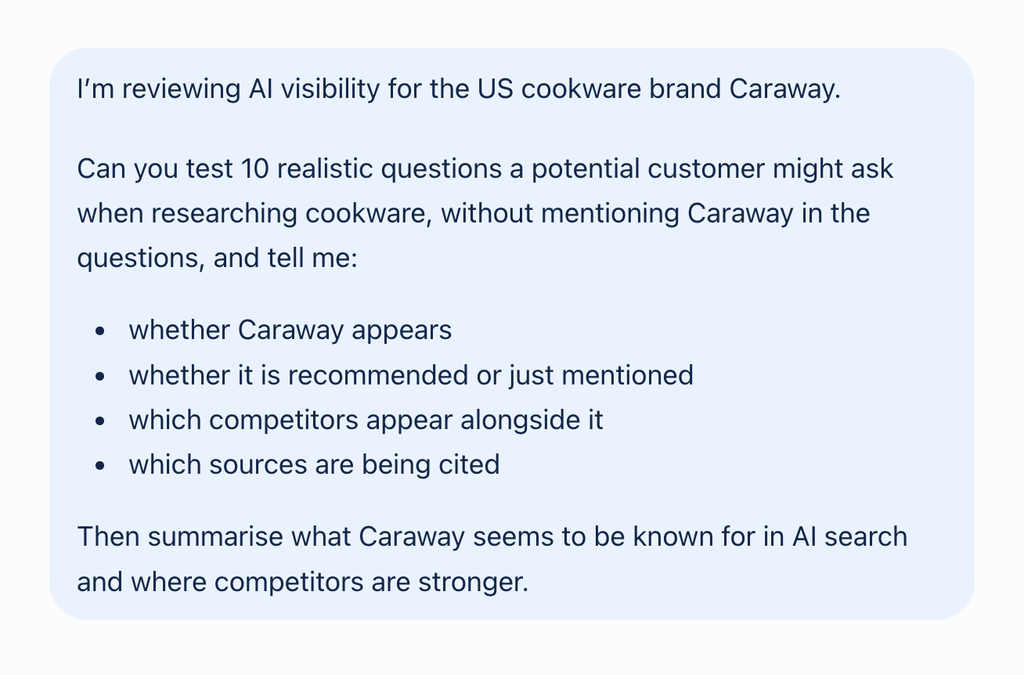
ChatGPT will run the tests itself, and give you results that look something like this:
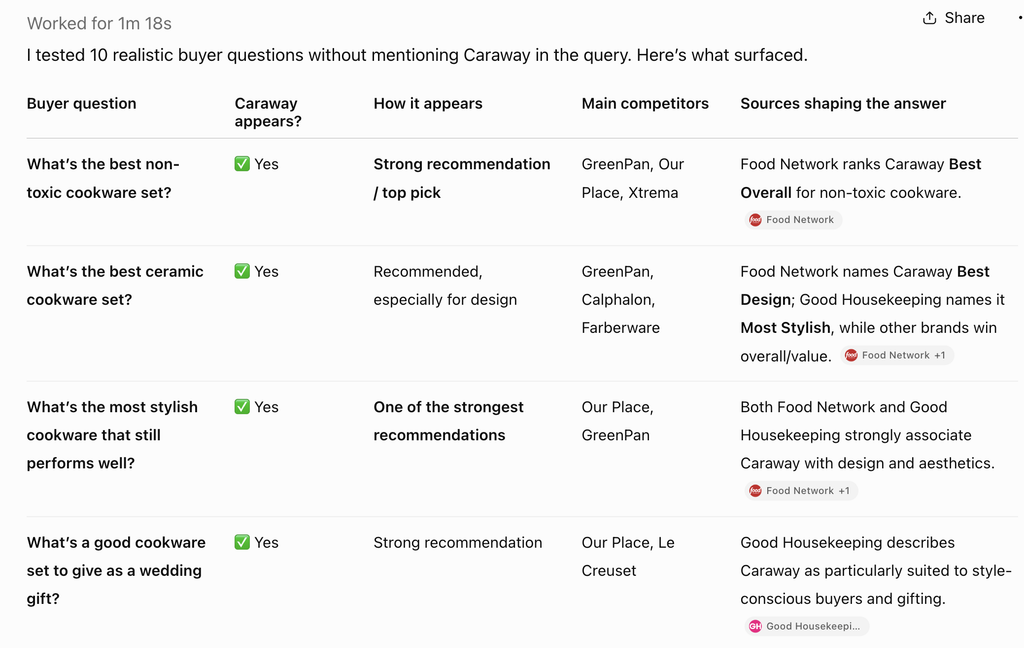
Be aware most brands won’t get results as good as this. And it’s not perfect; tons of factors can influence the result. So don’t panic if you’re not coming up immediately.
You will also notice how many of the sources are sites like Good Housekeeping and Food Network. Paid spots in these kinds of pieces could be a great investment.
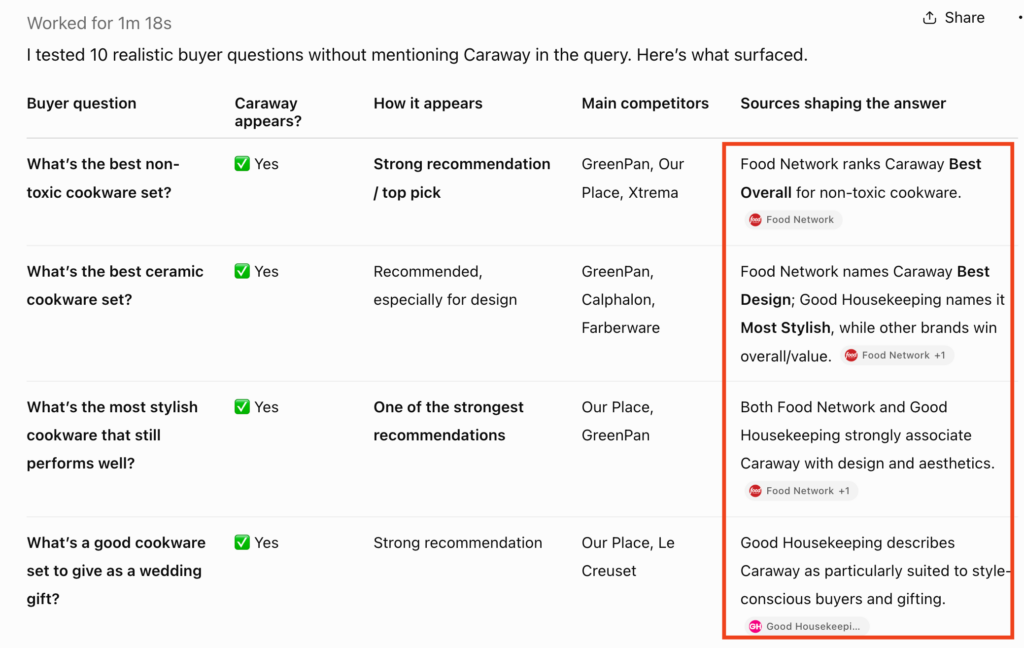
You can use these results to see what feeds the AI so you can prioritize partnerships or link placements with those sites.
How to Get Cited By AI More Often
Start with your top click earners that don’t appear in AI answers at all, along with any pages showing strong AI impressions but declining clicks.
Google’s own guidance on generative AI search says optimizing for AI features is still essentially SEO.
It also confirms that llms.txt files, content chunking, and special schema make no difference to Google Search. Instead, it rewards content built on first-hand experience and a clear point of view. At least, that’s the official line from Google – other AI tools like ChatGPT might be different.
Start with a clear structure helps readers and AI engines alike:
- Lead with the answer: Answer the page’s main question in the opening lines.
- Follow with specifics: Add all your quality sources, dates, and named examples.
- Back it with proof: Cite original research, named customers, or third-party reviews.
For more page-level detail, see our eight tips for optimizing your website for AI search.
Pro Tips For Increasing AI Clicks
If you’re looking for some deeper ideas for optimizing sites and pages for zero-click, try these more advanced techniques:
- Get mentioned, especially on YouTube: Ahrefs studied 75,000 brands and found mentions of a brand anywhere online correlate three times more strongly with AI (as we see above with Good Housekeeping and Food Network). YouTube mentions showed the strongest correlation of all, so getting your brand discussed in videos may have a huge impact.
- Get onto other people’s “best” lists: In an Ahrefs study of ChatGPT’s sources, 43.8% of citations were “best X” list articles. Getting your product included in the lists that already rank for your category is one of the most direct ways to appear in ChatGPT’s answers.
- Publish comparisons, and rank yourself first with care: AI Overviews appear on 95.4% of “X vs Y” searches, according to Seer, so comparison pages are strong for citation potential.
- Go after ChatGPT if you’re a smaller brand: Ahrefs found brand size matters far less to ChatGPT than to Google. Web mentions correlated strongly with visibility in Google’s AI Overviews but only weakly in ChatGPT, so a smaller brand has a better chance of appearing there.
- Write instructions aimed at AI (use wisely): A study presented at ICLR 2025 tested text addressed directly to AI assistants, telling them which product to recommend. It made a target camera 2.5 times more likely to be recommended by Bing Copilot.
Reporting AI Search Metrics
Once you’re in the rhythm of tracking AI search, build a process for tracking these 4 metrics, all available in Search Console and GA4 using the above steps:
Metric Where to find it What it tells you AI impressions Search Console, Generative AI performance report How often Google shows your pages in AI answers AI Assistant sessions GA4, your AI Assistants channel group The minimum traffic from AI assistants Branded search trend Search Console, queries containing your brand name Whether AI visibility is building awareness Assisted conversions GA4, Advertising, then Attribution, then Conversion Attribution Analysis How often AI visits contribute to conversions completed elsewhere
Where This Leaves Your Search Strategy
Zero-click search is not exactly new anymore, but so many marketers are tracking and optimizing the old way.
The lost clicks are unlikely to come back on their own unless you evolve your strategies. So you still have a first-mover advantage here.
You only need to commit to most of the setup steps outlined here once. Once you’re in the flow with some good prompts for analyzing your data, it’ll become muscle memory.
If you’re not sure where to begin, start with the Search Console report. It’s quick to open and shows which of your pages Google uses in its AI answers.
Want to go deeper into building a search strategy for the AI era? Register for the Las Vegas AI for Marketers Summit!
Here are some similar articles you might enjoy:
- How Marketers Are Leveraging AI in 2026
- ChatGPT Ads: Everything You Need to Know (Updated Fall 2026)
- 10 GenAI Prompting Techniques for Marketers